
 Contact
  Account


Please note I cannot help you schedule your appointments. This post is for information purposes only. If you would like one on one help with your immigration process, you need to hire an immigration facilitator. To get access to our recommended contacts you must first purchase our COMPLETE MEXICO RELOCATION ONLINE GUIDE .
How To Schedule a Mexican Consulate Appointment
The first thing you have to determine is how the consulate is booking appointments for visas. So please Google “Mexican Consulate and Name of City”. In the search results, make sure you only follow sites ending in .gob.mx– these are official government sites.
Once you find the main page for the Mexican Consulate you are trying to schedule at, navigate towards “Visas for Foreigners” or Visas para Personas Extranjeras”
The consulate will usually indicate how they would like you to book an appointment. They’ll state whether they want you to book it online on their Citas.Sre.Gob.Mx site. Or they might indicate an email address to which to send your request. You can post an appointment request through the official website, by email, or through other communication channels such as WhatsApp, as specified by the consulate.
Some consulates have their own booking systems on a separate site.
If they have an email where they want you to book an appointment, please send them an email specifying if the appointment is for you or you and your family.
Please also keep in mind that, depending on the consulate, they may require one separate appointment for you and another for a dependent. But this varies by consulate. So please read their website and see what instructions they have.
Eligibility and Requirements
Before you go ahead and schedule your appointment at a Mexican consulate, let me share something super important with you—you’ve got to make sure you actually meet the requirements for your visa application! And trust me, I’ve seen too many people skip this step and get disappointed later.
Here’s the thing: if you’re a foreign national wanting to visit, work, or live in Mexico, you absolutely must have a valid passport with at least six months left before it expires from when you plan to enter Mexico. This isn’t negotiable, my friend. Whether you’re going for a tourist visa, business visa, or permanent resident status, this rule applies to everyone!
Now, besides that valid passport, you’ll need to fill out the official visa application form. The good news? You can download it right from the consulate’s website! But wait, there’s more—you’ll also need supporting documents. Think proof that you can financially support yourself, a recent passport photo, and depending on what type of visa you’re after, maybe evidence of your income or investments. If you’re applying for permanent residency, be ready to provide even more details and paperwork as the consulate general outlines.
When you’re ready to actually schedule that appointment, you’ll create an account on the Mexican consulate’s online portal. During this process, they’ll ask for your basic info—full name, birthday, nationality, email, and an emergency contact. Please use accurate contact information! This is how they’ll confirm your appointment and reach out if they need anything else from you.
Got a family? Here’s something many people don’t realize—most consulates require separate appointments for each person, including your kids and dependents. Always double-check the specific procedures for your consulate because things can vary between the Consulate General de México en Canada, the USA, and other locations around the world. The consulate’s website will have the most up-to-date instructions on how to request your appointment, select your nationality, and pick from available time slots.
Some visa applications come with a fee, which you can usually pay online or in person at the consulate. Make sure to review the payment instructions and what methods they accept on the consulate’s website before your appointment date. Trust me, you don’t want any surprises on appointment day!
Here’s my advice: because appointment slots fill up fast, especially during busy travel seasons, plan ahead! I can’t stress this enough. Check the consulate’s website regularly for new openings. Wait times vary by location, so booking your appointment well in advance is absolutely the way to go.
Finally, keep this in mind—the Mexican consulate might ask for additional documents or information at any point during the process. So stay on top of your emails and keep checking the consulate’s website for updates or new instructions. By staying organized and following their procedures closely, you’ll make your visa application process as smooth as possible. And believe me, that’s exactly what you want when you’re planning your move to beautiful Mexico!
Booking Online On The Citas Website
Many Mexican Consulates book residency visa appointments through their WhatsApp Number. Text Whatsapp Number +1 (424) 309-0009. And follow the prompts
Booking Online On The Citas Website
Or you can also book through the online portal used by various consulates worldwide. This is a bit more involved but I’ve broken up the steps into Part 1 and Part 2.
Part 1 walks you through the process of creating an account. Part 2 walks you through actually scheduling an appointment with a Mexican consulate. If you don’t want to schedule an appointment at the moment, you’ll only need part 1.
Let me tell you something: this site and its appointment scheduler give you a taste of how things work in Mexico. Patience is the key when you’re dealing with anything regarding legalities. Mexicans love procedures and paperwork.
Finding appointments can still be challenging at some consulates, and unfortunately, I don’t see this changing soon. Some consulates release new appointment slots each week, so it’s important to check the site regularly for updates.
If your local consulate requires you to book your appointment through Mexitel, I’ll walk you through each step below:
First, go to the Mexitel website https://citas.sre.gob.mx
Quick note- If you live in Atlantic Canada (Nova Scotia, New Brunswick or PEI) you will have to make an appointment at the Mexican Consulate in Montreal. If you’re unsure about entry requirements like the Forma Migratoria Multiple (FMM), learn more here.
PART 1
Create an account
First, go to the site https://citas.sre.gob.mx
Protip: I’ve had issues in the past creating an account whenever I use my Chrome browser. However, using Firefox has been smooth and without any glitches. So, if you have problems getting through this process, try using a different browser.
Translate to English If It Doesn’t Default To It
On the top-right corner, there is a drop-down under “idioma”. Click on it, and select EN. This stands for English. When you click on “EN” the site with translate to English.
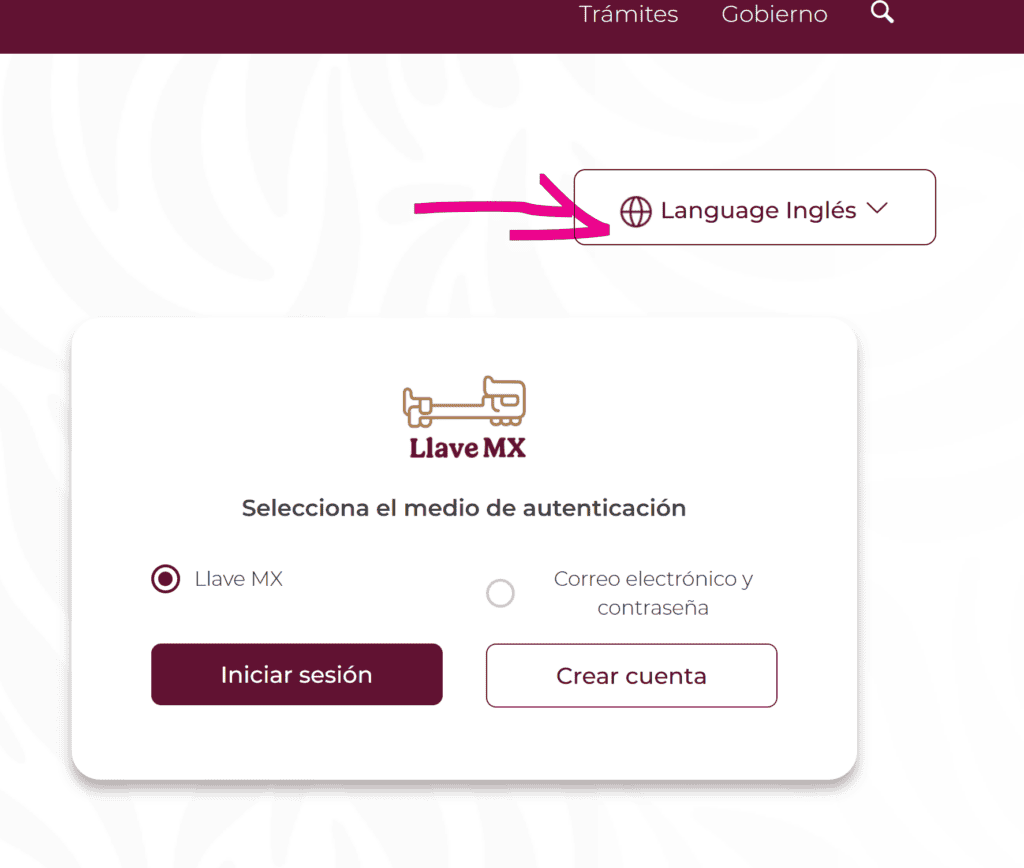
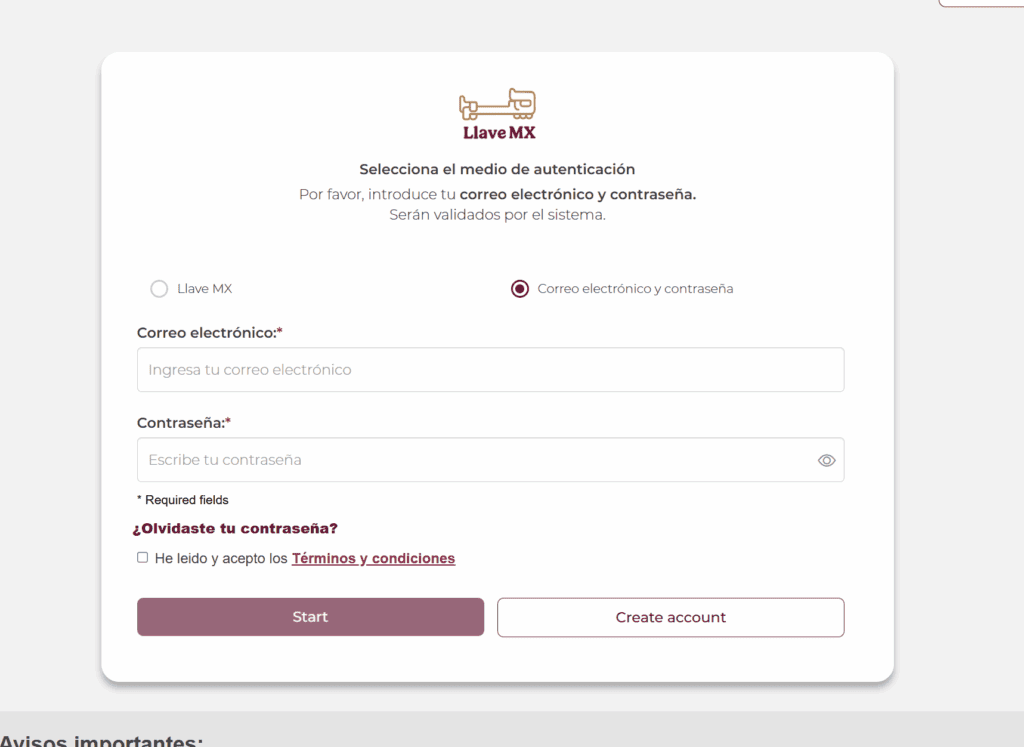
Click on “Correo electrónico y contraseña” (email and password) and click on “crear cuenta” (create account)
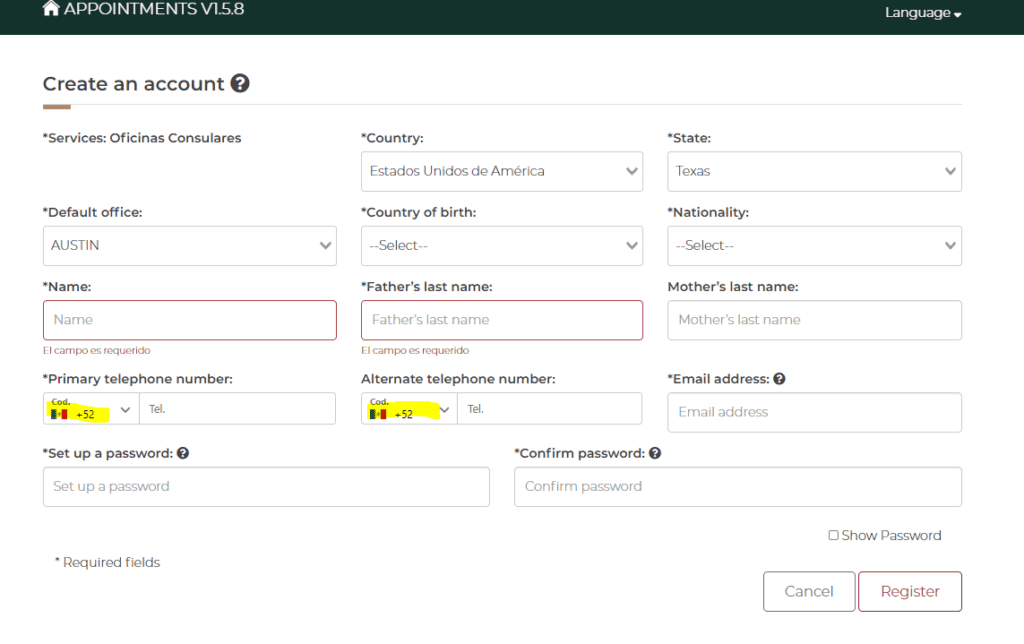
fill out the account information. Under “services” you will choose “oficinas consulares” (consulate offices).
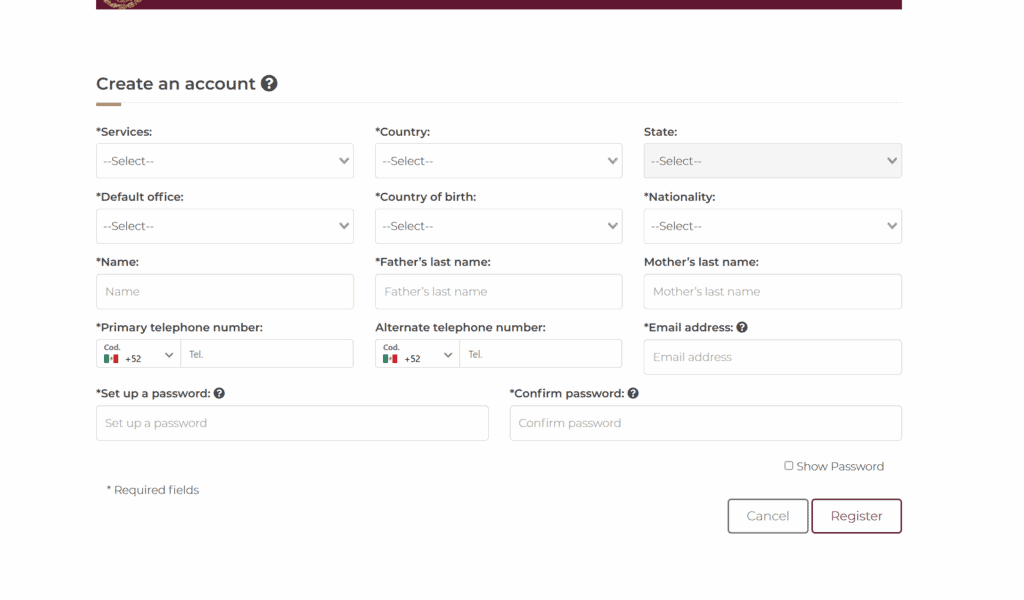
Choose Your Country From The Drop Down
Under nationality, for the USA it is Estadounidense or for Canada it is Canadiense.
For Canada, it is the same- Canada. However, the provinces are all in Spanish.
Nationality
If you are from the USA, then your nationality is Estadounidense. If you are from Canada, your nationality is Canadiense.
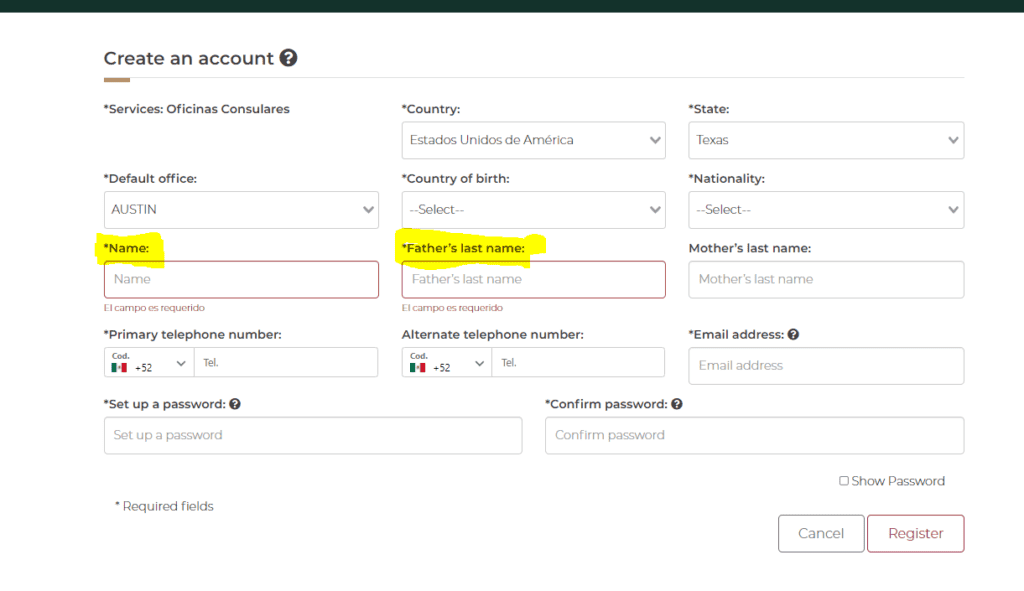
Only First and Last Name Are Required
In Mexico, it is common to register your children with both their fathers’ and mothers’ last names. Since this is not common in most other countries, the mother’s last name is not a required field. You will only need to fill out your first and last name.
Make Sure Your Country Code Is Correct
Under primary and alternate phone numbers, you should keep in mind it will default to Mexico’s country code. (52) If your phone number is from the U.S. or Canada it should be a +1. Look up the United States on the drop-down. If you are applying from a different country, select your country code from the drop-down.
Set Your Password
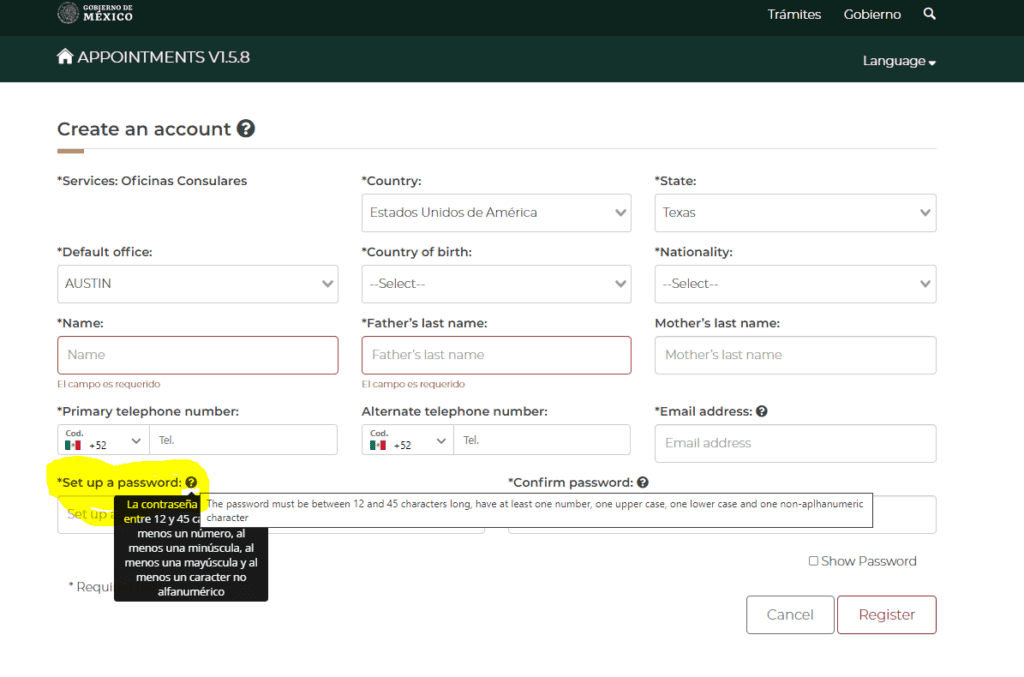
Your password must be between 12 and 45 characters long. It should have at least one uppercase and one lowercase letter. It should also have one non-alphanumeric character. For example * , & , # , ^, ! , ?
Validate Your Account
To finalize your account creation, you will need to verify your account. Some people will be asked to do this by clicking to verify their account over email, and some will be asked to verify through a token.
If you log out and try to log back into the online portal but are getting an error about your account being locked, don’t worry. Reset your password, follow the instructions you get by email, and this will help you log in again.
PART 2
Proceed to Schedule Your Appointment
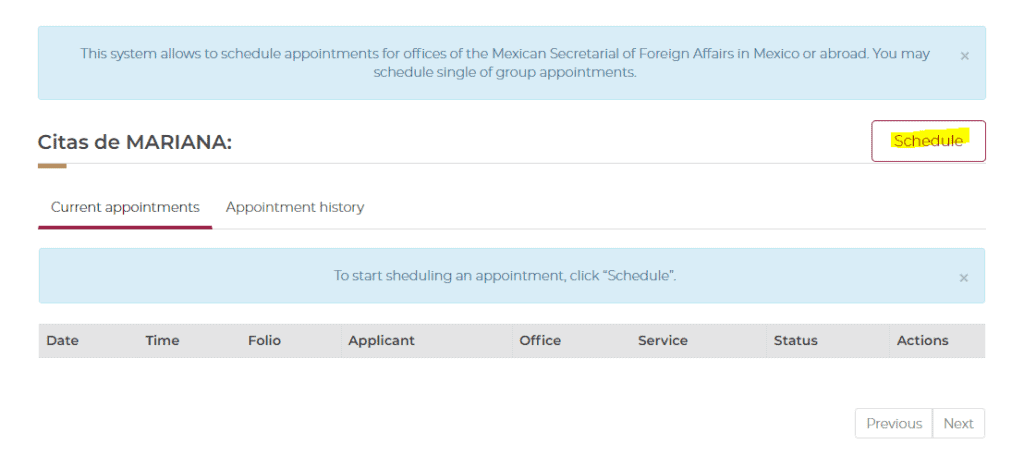
Once you click the link in your email, you will be redirected to the screen below. You should receive a confirmation of your mexican consulate appointment, which serves as a sign that your booking is complete. Be sure to save this confirmation for your records, as you may need to present it during your visit.
Click on “Schedule” to look up available times and dates at the Mexican consulate you registered on your account.
If you don’t want to schedule an appointment at this time, you can close out of this screen. If you wish to schedule an account in the future, you will need to visit https://citas.sre.gob.mx and log in with your information. If the site says “your account is blocked,” try resetting your password, and that should let you log in.
Select Your Consulate
In most cases, you don’t need to visit the Mexican consulate nearest you to process a residency visa. You can request a Mexican consulate appointment at any consulate around the world, depending on availability and their policies. Most Mexican consulates, with few exceptions, allow people from other states to schedule appointments. To change the Mexican consulate you wish to schedule an appointment with, select the state under “Estado” and the city under “Oficina Consular.” (see example below)
If you make a mistake at any point, all you have to do is click on “Cancelar” and it will start the process for you from the beginning.
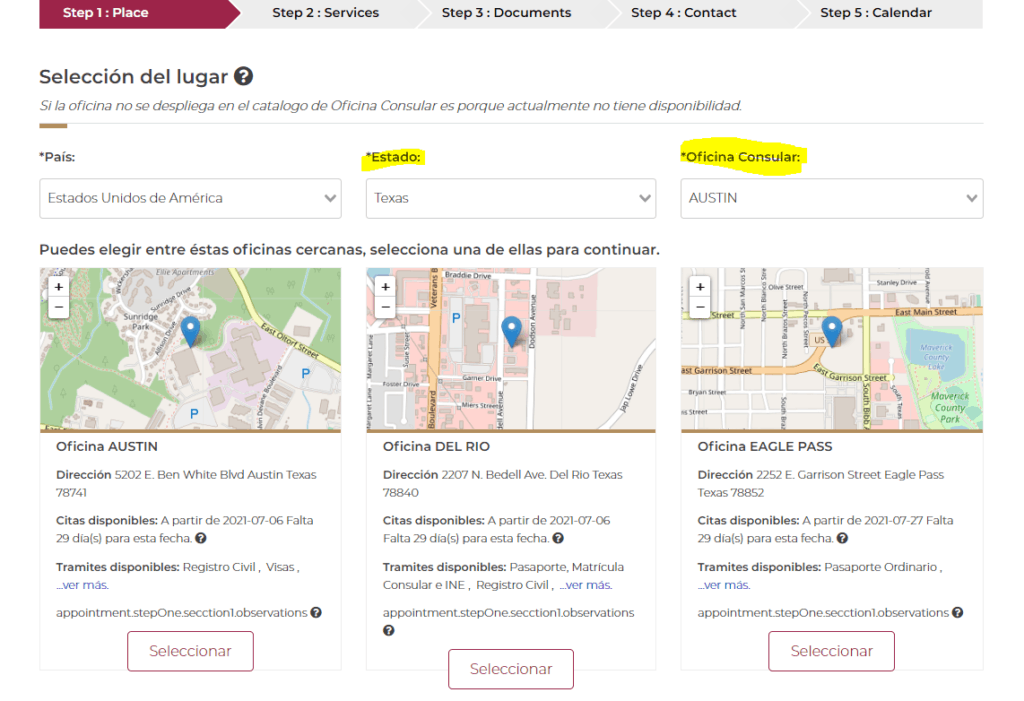
If your nearest consulate does not show up like the example above, that means they are not using this online portal for appointments, or they are not taking appointments for the time being. Please check the consulate’s website for instructions.
Make Sure The Appointment Type is for VISA
When you select the Consulate in which you will make an appointment, make sure the appointment type is VISA. This ensures your appointment is scheduled for the required visa interview. If this is not an option when you’re scheduling an appointment, that means there is a high chance the Mexican Consulate will turn you away.

More Information About You
Once you have selected the consulate you wish to make an appointment with, you’ll need to fill out more information on the person who will be visiting the consulate. Once you have filled this portion out, you have to click on “Verify”
Below the image, I’ve included the translations for each field.
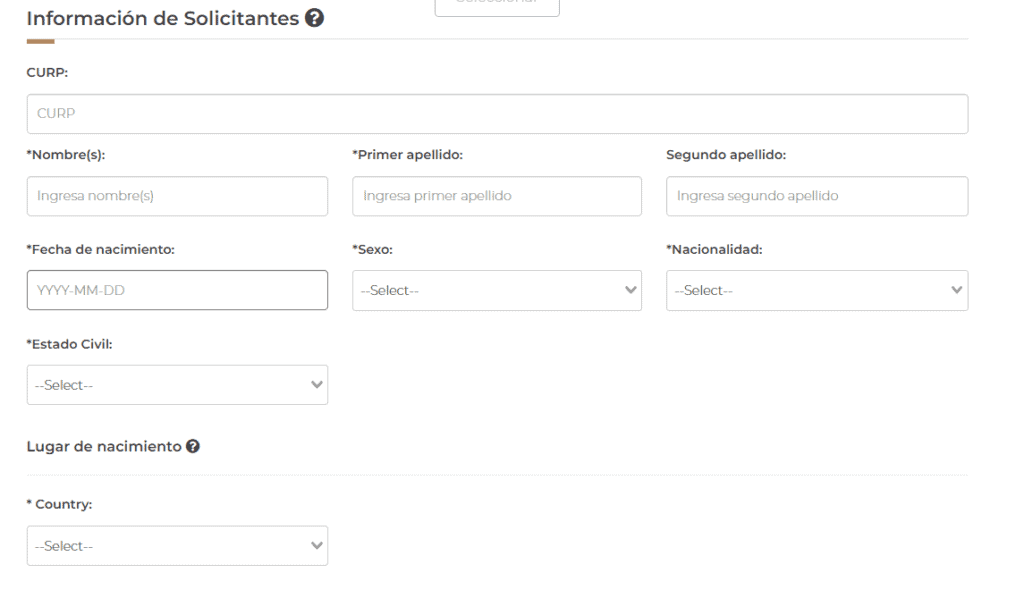
- Nombre= Name
- Primer Apellido= Last Name
- Segundo Apellido= Mother’s Last Name (you don’t need to fill this part out if you do not have this in your passport)
- Fecha de nacimiento= Date of Birth (the format is YYYY/MM/DD)
- Sexo= Sex
- Femenino= Female
- Masculino= Male
- Nacionalidad= Nationality
- Estado Civil= Marriage Status
- Soltero= Single
- Casado= Married (if you select this option, you’ll get a message on adding your last name to your passport. Select No. This doesn’t apply to you)
- Viudo= Widowed
- Union Libre= Common Law
- Divorciado= Divorced
- Lugar de nacimiento = Birth Place
- All countries are in Spanish. For USA look up “Estados Unidos”
- Estado= State
- Condado= County
- Localidad= Locality (not a required field)
Do you have a Mexican Passport or Consular ID?
Most people do not have a Mexican passport or consular ID. Therefore, click “No” on this option. Once you are done, select Verify. Otherwise, you cannot proceed. Then click on “Continuar” to continue.

Appointment Type Should Be VISA
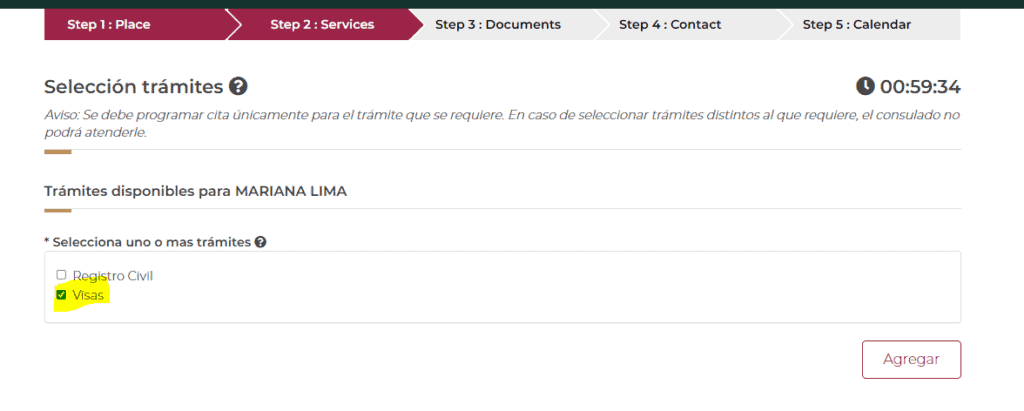
Once you fill out your personal information, you will get another window like this. Again, make sure the option for “VISA” is selected. If this isn’t an option, then that means this consulate isn’t processing visas at the moment. Or it might mean to schedule a residency visa appointment, you might have to email the consulate. Check their website for more information. (Google search: Mexican Consulate Name of City)
Example below. Once you are done, select “Agregar.”
Select The Type Of Procedure (Tramite)
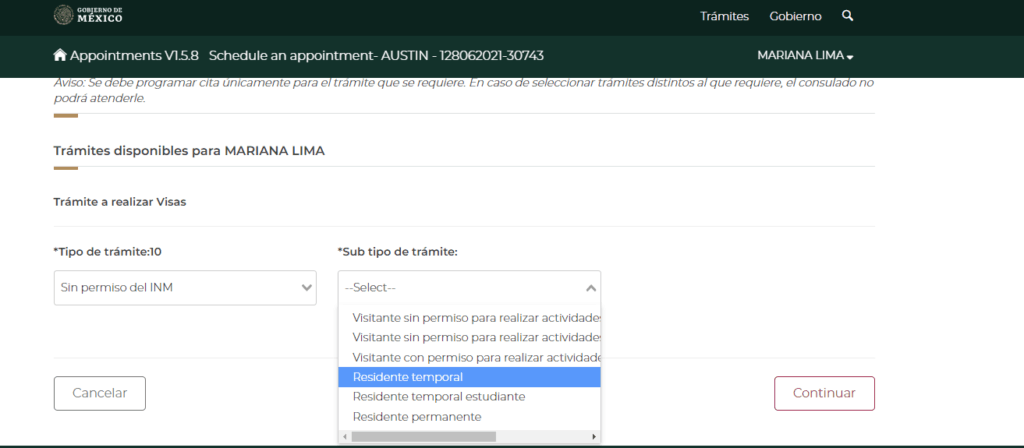
When you intend to initiate your residency visa, you should select “Sin permiso del INM” under “Tipo de Tramite. This means you don’t have permission from INM which is Mexico’s Immigration Authority.
You must also qualify for the specific type of residency you are applying for, based on the consulate’s requirements.
Select The Type of Visa You Are Applying For
Depending on the type of visa you are applying for, you will have to select it from the drop-down under “Sub tipo de tramite.” For some visa types, you may be required to show proof of cash, bank statements, or other financial resources to demonstrate economic solvency as part of your application. You should select either “Residente Temporal” (temporary resident) or “Residente Permanente” (permanent resident). Click on “Continuar” to continue.
Additional Details
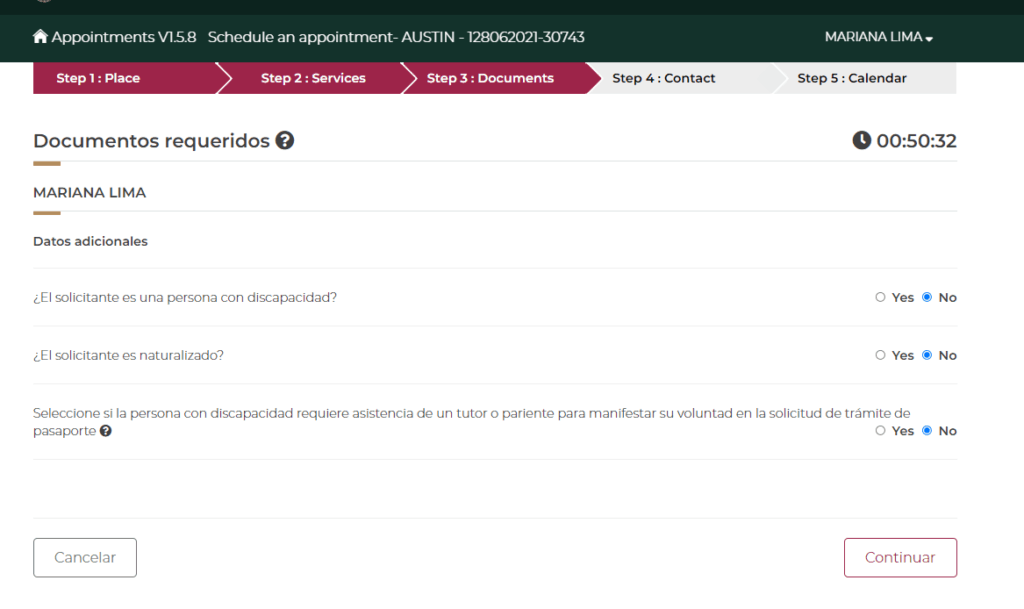
The Mexican consulate would like to know if the person requesting an appointment is handicapped, is a naturalized citizen, or someone providing assistance to the handicapped person.
once you’re done with this section, you will be brought to a window like this. Where you must fill out your passport information.
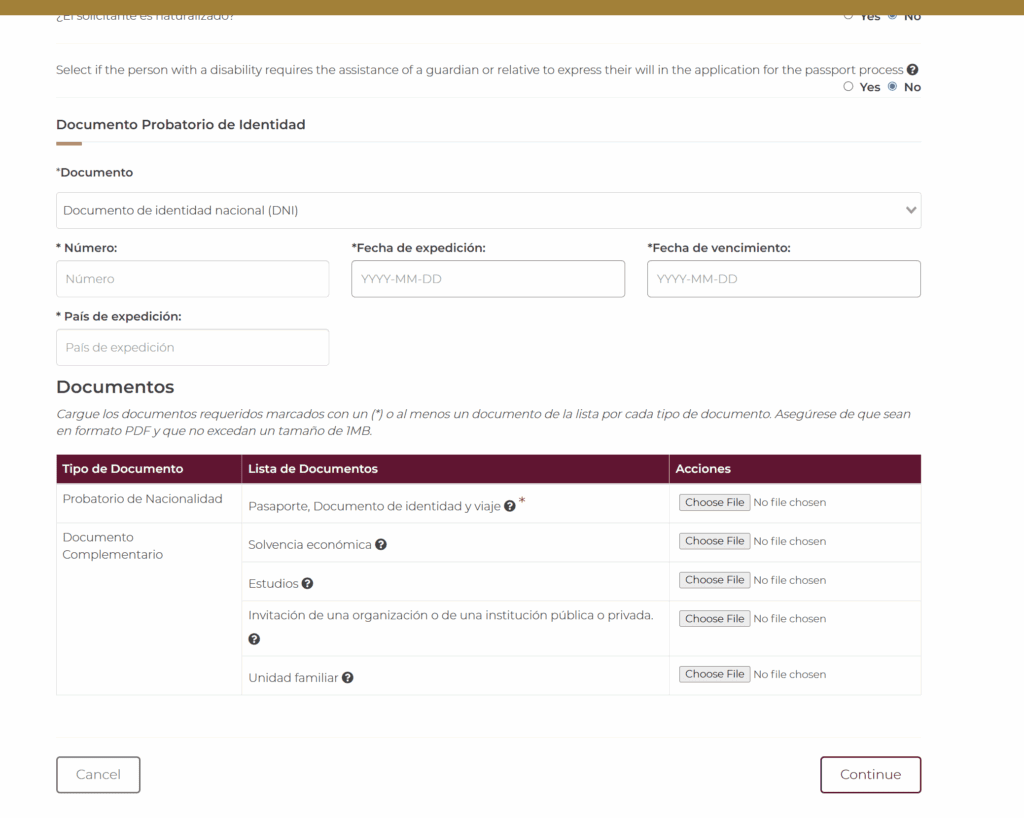
Numero is the passport number
Fecha de expedición is issue date
Fecha de vencimiento y expiration date
Pais de expedicion is issuing country
Uploading Documents Needed
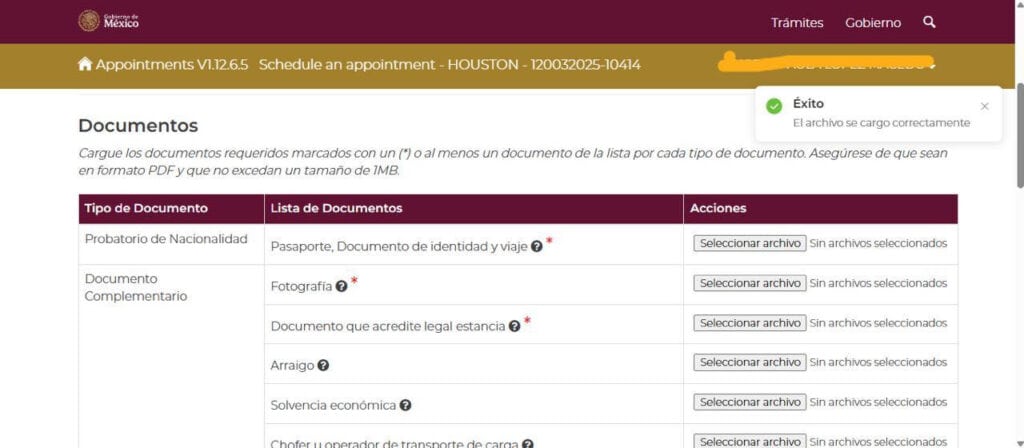
After selecting the appointment you want through the calendar, most consulates will ask you to upload specific documents. You must submit these documents through the online portal to complete your application.
You are only required to upload the documents with a red asterisk next to them. In the case for people applying for residency, you only have to upload your current passport.
The site only allows PDF files for this section. I personally used Canva to turn a JPG into a PDF.
Another tip in this section is to try to limit the size of the PDF you upload. There have been reports of people unable to upload these documents because of their size. The file cannot be larger than 1MB.
Your Contact Information And Emergency Contact
I know this will seem a bit redundant at this point, but you need to fill out your contact information once more. Additionally, the Mexican consulate will also need an emergency contact. Below the example, I’ve included the translations for each field:
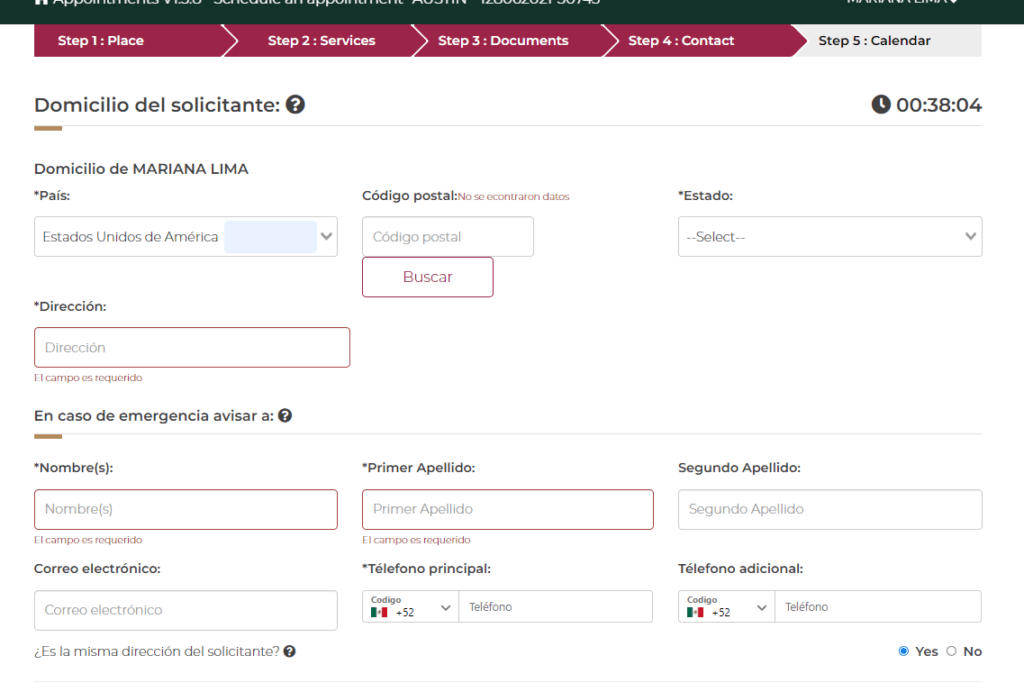
- Domicilio= Address
- Pasi= Country
- Codigo Postal= Zip Code (if you live in the U.S., you can enter your zip code and click on “Buscar.” This will auto-populate your state and county fields.
- Estado= State
- Condado- County
- Colonia= City
- En case de emergencia avisar a= In case of emergency contact
- Nombre= Name
- Primer Apellido= Last Name
- Segundo Apellido= Mother’s Last Name (not a required field. Do not fill out if you do not have 2 last names on your passport)
- Correo electronico= email address
- Telefono principal= Phone number (for U.S. phone numbers, select United States or the +1 area code)
- Telefono adicional- additional phone number
- Es la misma direction del solicitante?= Is the address the same as the applicant?
Click on “Continuar” to continue
Select A Time and Date Available
Not all consulates will have times and dates available. I suspect that with the rollout of this new interface, the Mexican consulates will slowly add more appointments to their calendars. If the consulate you select has a time and date available, it’ll show it on the calendar below in either green (high availability) yellow (low availability), or orange (almost no availability). (see below)
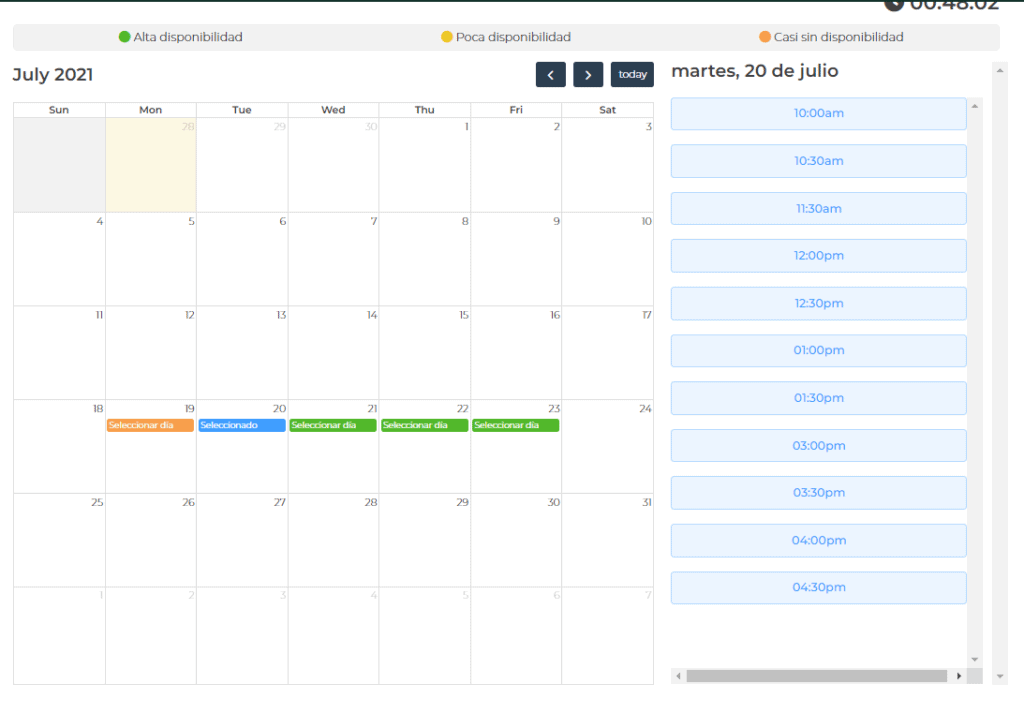
Unfortunately, some consulates don’t have a lot of availability. I have found that you have to check at various times of day and every day.
If there is no availability, the calendar date will be empty. If there is no availability in the future, it could also mean that the consulate does not have an online option for visa appointments. I suggest visiting their home page and looking for the section under “Visas.”
Many consulates have information on how to book an appointment for residency visas under this section.
Having a Hard Time Finding Appointments?
Pro Tip-In some cases, you’ll have better luck getting an appointment by checking the local consulate’s website and looking for an email address or contact at the consulate that can help you schedule an appointment. Sometimes, this information is buried in the website’s pages, usually under “Visas for Foreigners” or Visas para Extranjeros.
If you have specific questions or concerns about your visa case or appointment status, you can make inquiries directly to the consulate using their contact information.
In some cases, it may be impossible to get an appointment at your local consulate, which means you may need to travel to a different consulate with more readily available appointments.
Delays in securing an appointment may impact the timing of visa issuance, so it’s important to monitor the process closely.
If you need help making an appointment at a Mexican Consulate, we recommend a few immigration facilitators. Check out our COMPLETE Mexico Relocation Guide to access our step-by-step online guide and directory of vetted contacts. or learn more about moving to Mexico.